
Reply to YouTube Comments in Any Language — Without Speaking It (Persona, Tone, and Back-Translation)

Reply to YouTube comments in any language with VidAI: it detects the commenter's language, drafts a reply in your voice, then translates the comment for you and back-translates your reply — so you can answer Spanish, Arabic or Japanese viewers in seconds and know exactly what you're posting.
🇺🇦 Читати українською: Відповідайте на коментарі YouTube будь-якою мовою
The moment your video reaches viewers outside your language, a new problem appears under it: comments you can't read, from people you'd love to keep. Most creators do one of three things — ignore them, paste into a translator and hope, or answer in English and lose the person. None of those scale past a dozen comments.
VidAI's comment assistant handles the whole loop inside YouTube Studio. This guide shows exactly how it works, what it protects you from, and how to set it up so every reply still sounds like you.
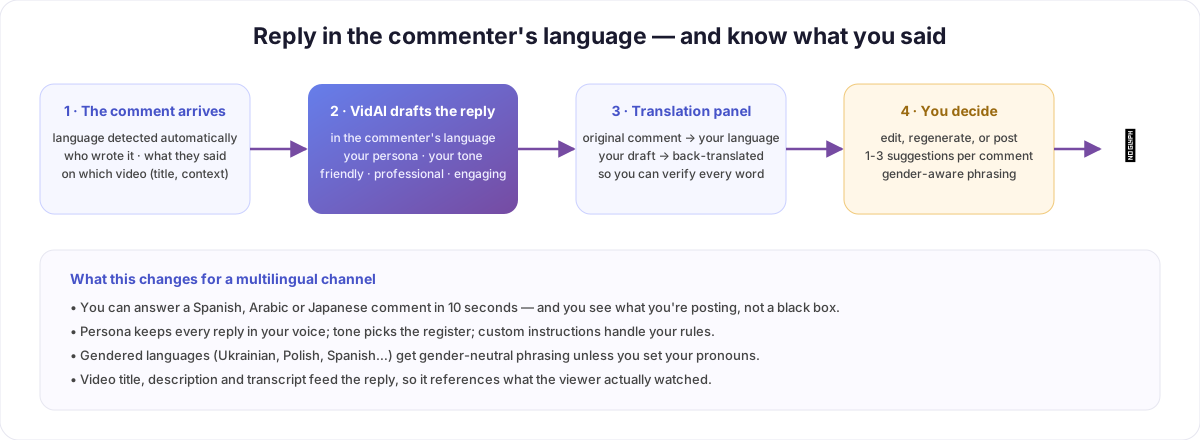
What happens when you click Help on a comment
1. The language is detected. VidAI reads the comment, identifies its language, and — this is the rule that matters — drafts the reply in the commenter's language. A Spanish viewer gets Spanish. If the language is ambiguous (a single emoji, a name), it falls back to a short universal acknowledgment rather than guessing wrong.
2. The reply is written in your voice. Three inputs shape it: - Persona — a description of who's replying ("the host of a friendly woodworking channel, warm, a bit nerdy about tools"). Every reply keeps that voice. - Tone — friendly (warm, community-building), professional (more formal), or engaging (asks back, invites the viewer to continue). - Your instructions — standing rules, like "never promise release dates" or "always thank first-time commenters".
It also sees the video — title, description, and transcript — so the reply references what the viewer actually watched instead of being generic. And in gendered languages (Ukrainian, Polish, Spanish, Russian…), it prefers gender-neutral phrasing unless you've set your pronouns.
3. The translation panel. This is the part that makes answering in a language you don't speak safe:
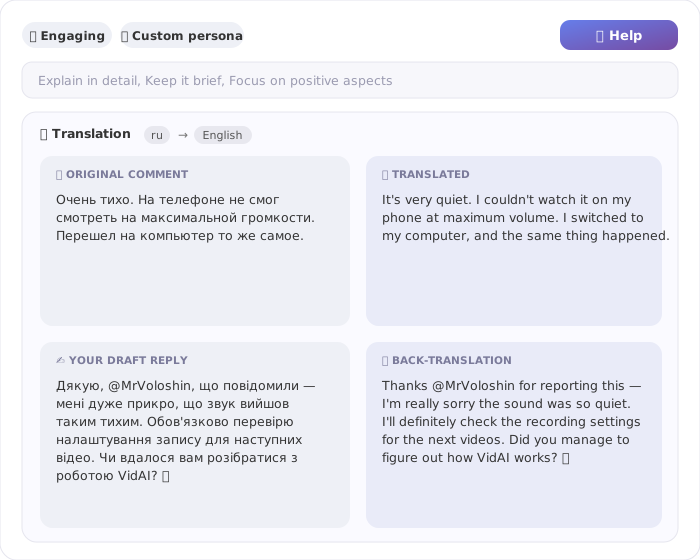
Four quadrants: the original comment, the comment translated into your language, your draft reply in the commenter's language, and — crucially — the draft back-translated into your language. You read what they said, and you read what you're about to say. No black box.
4. You decide. Edit the draft, regenerate, or ask for up to three alternatives. Nothing is posted until you click Reply.
Quality vs speed
A focus setting controls how much context is loaded per reply. Quality (default) gives the model the full description, transcript excerpt and persona. Speed halves those budgets for faster replies when you're clearing a hundred comments after a launch. Same rules, same voice — just a shorter brief.
Why this beats "paste it into a translator"
| Translator + manual reply | VidAI comment assistant |
|---|---|
| You translate in, write, translate out — three tools | One panel inside YouTube Studio |
| Reply sounds like a machine | Persona + tone: it sounds like you |
| You can't verify what you're posting | Back-translation shows you exactly |
| Generic — no idea what the video was about | Title, description and transcript in context |
| Gendered languages: you'll misgender someone eventually | Gender-neutral by default, your pronouns if set |
Setup in two minutes
- Install VidAI and open your channel's Comments in YouTube Studio — the ✨ Help button appears on each comment.
- In settings: write your persona (two or three sentences), pick a default tone, and add any standing instructions.
- Optional: set your pronouns for gendered languages, and focus (quality/speed).
- Click Help on a comment. Read both translation quadrants. Post.
FAQ
Which languages does it handle? Any language YouTube viewers write in — detection and generation are model-based, not a fixed list; the translation panel covers 90+ languages.
Will the reply always be in the viewer's language? That's the default and strongly preferred rule. You can override per reply or set a fixed reply language in settings.
Can it reply automatically? It drafts; you post. Every reply goes through your click — intentionally.
Is this just ChatGPT? The drafting uses leading AI models, but the value is the pipeline around them: language detection, persona and tone enforcement, video context, gender-aware phrasing, and the back-translation check — built for this exact job.
Ready to stop ignoring half your comments? Install VidAI — and if your videos aren't yet reaching those viewers, start with translating them into 90+ languages.



