
How VidAI's AI Council Picks Your YouTube Title (2 AIs, a Blind Judge, and Why One Model Isn't Enough)

How VidAI's AI Council picks your YouTube title: two or three AI models propose, a blind judge scores them on one scale, and a ranker keeps only genuinely different ideas — five titles in under 15 seconds, each tagged with the angle it plays.
🇺🇦 Читати українською: Як AI-рада VidAI обирає назву для вашого YouTube-відео
Ask one AI for five YouTube titles and you usually get five versions of the same idea — the same hook, reworded. Ask it to score its own work and it grades generously. That's the quiet problem with every "AI title generator": one model, one prompt, one opinion, and a self-assigned score that means nothing.
VidAI's title generator was built around that problem. It's called the AI Council, and this guide explains exactly what happens in the ~12 seconds between clicking AI Titles in YouTube Studio and seeing your five results — and why each part exists.
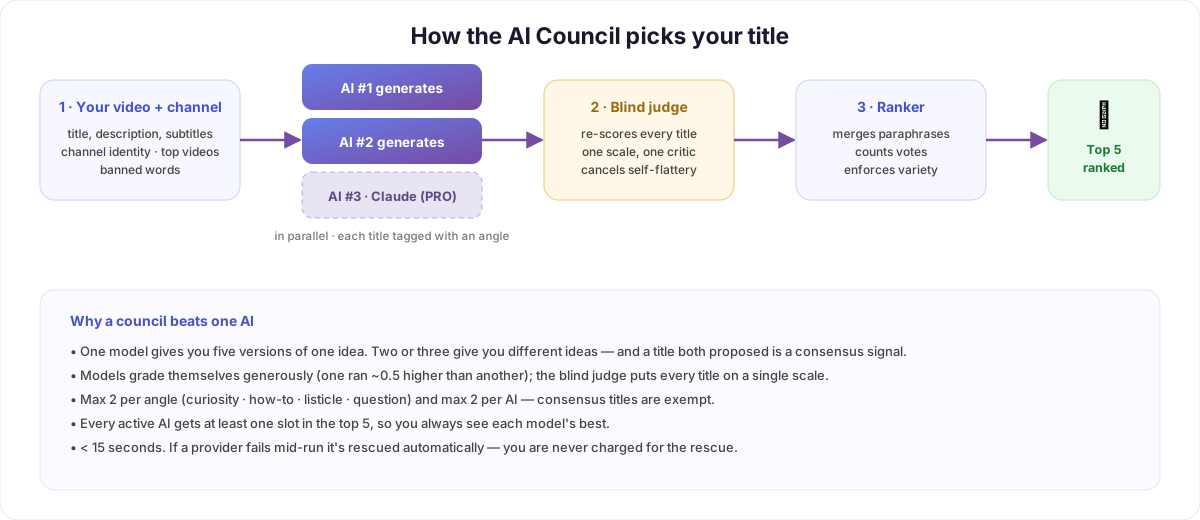
Step 1 — It starts from your channel, not a blank page
Before any model writes a word, VidAI assembles context: the video's title, description and (where available) its subtitles, plus a channel profile — what your channel is about, which of your videos perform best (proven signals for your niche), and any words you've banned. A title for a cooking channel with a track record in 15-minute dinners should not read like a title for a finance channel. With most tools, it does, because the model starts from zero every time.
Step 2 — Two AIs write in parallel (three on PRO)
Two different AI models receive the same brief and generate candidates at the same time — not one after the other. PRO users can enable a third voice, Anthropic's Claude, via the 3 AI models setting. Every candidate is tagged with the angle it plays: curiosity, how-to, listicle, question, and so on.
Why different models rather than one model asked three times? Because a model asked twice gives you its own idea twice. Two models with different training, different instincts about hooks, and different vocabulary give you different ideas — and when both independently land on the same title, that agreement is information.
If a provider has an outage mid-run (it happens — rate limits, API errors), VidAI automatically re-runs that slot on its most reliable backup, so you still get a full council. You are never charged for that rescue; the failure is invisible to you.
Step 3 — The blind judge
Here's the part almost nobody else does. Each model also scores its own titles — and models flatter themselves. In our logs, one model's self-scores ran about half a point higher than another's across the board, so a naive "sort by score" quietly produced a top five dominated by the more confident model, not the better titles.
So VidAI sends the merged pool to a separate judge model that doesn't know which AI wrote what. It re-scores every title on a single scale, using the same channel context. The judge has a backup judge and retries behind it; only if every judge is unavailable does the system fall back to the generators' own scores — and it tells you so in the admin log.
Step 4 — The ranker: votes, variety, and no monopolies
The final ranking is deterministic — no AI involved, so it's fast and reproducible:
- Merge paraphrases. Two titles that differ by less than ~20% of their characters are treated as one idea, and the list remembers which AIs proposed it (
voted by 2 AIs). - Consensus wins. A title two or three models independently proposed bypasses the caps below — it belongs to the whole council.
- Max 2 per angle. You won't get five questions. Curiosity, how-to, listicle and question hooks each get at most two slots, so the list gives you real choice.
- Max 2 per AI, and at least 1 per AI. No model can monopolize the top five on self-confidence, and every active model is guaranteed its single best title in the results.
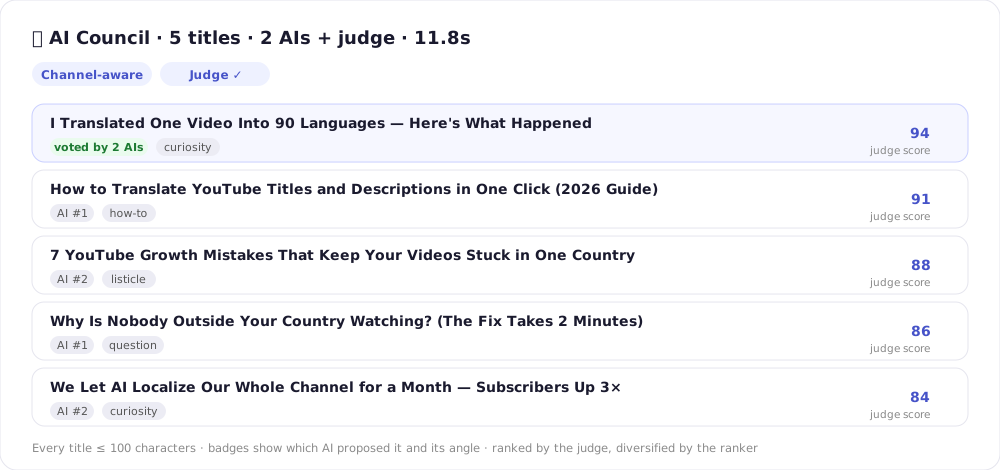
Every title is also kept under YouTube's 100-character limit, so what you see is what fits.
What this looks like from your side
- Open a video in YouTube Studio → click AI Titles in the VidAI bar.
- Watch the stepper: preparing context → analyzing channel → AI #1 → AI #2 → merging → judging → ranking — about 12 seconds.
- Pick a title, or regenerate. Each result shows its angle and who voted for it, so you can choose on strategy, not vibes.
Settings worth knowing: number of suggestions (default 5), 3 AI models (PRO), the channel persona and banned words that feed context, and your AI language — titles come back in your channel's language, not English by default.
Why this beats a one-model generator
| One-model tools | VidAI AI Council |
|---|---|
| Five variations of one idea | Five different ideas, tagged by angle |
| Self-scored — the model grades its own work | Blind judge, one scale, self-flattery cancelled |
| Same output for any channel | Channel profile: identity, top videos, banned words |
| Provider outage = error | Automatic rescue, never charged |
| No way to tell a strong title from a lucky one | Vote count: consensus titles are marked |
The honest caveat: a council costs more than one model — 8 credits for the standard two-AI run, 12 with the third model — because you're paying for two or three generations plus a judge. For a title that decides whether a video gets clicked for years, that trade is usually obvious.
FAQ
Which AI models are used? Two leading models by default, with Anthropic's Claude as the optional third on PRO. The specific models are configurable server-side and are updated as providers release better ones — your workflow doesn't change.
Does it work in my language? Yes — titles are generated in your channel's language (your AI language setting), and the 100-character limit is enforced on the actual translated text.
What if two models disagree completely? Good — that's the point. You'll get both angles, each marked with who proposed it, and the judge's score tells you which it rates higher.
Can I get more than five? Yes, set number of suggestions; the per-angle and per-model caps scale with the list size.
Is my channel data used to train models? No. Context is assembled per request and sent to the models as instructions for that request only.
Try it on your next upload: Install VidAI from the Chrome Web Store — the council runs on your channel's context from the first click. And when the title is chosen, translate it into 90+ languages in one more click.



