
How to Test Your YouTube Thumbnail Against Real Competitors Before You Publish (Free, No Upload)

How to test a YouTube thumbnail before you publish: a free, no-upload tool that shows your thumbnail inside a real YouTube feed next to the top videos for your topic — step by step, with what to look for and why the feed is the only test that counts.
🇺🇦 Читати українською: Як перевірити прев'ю YouTube поруч із реальними конкурентами
Every creator asks the same question before hitting Publish: is this thumbnail any good? And every creator gets the same useless answers — a friend says "looks nice", a paid tool offers an A/B test that takes days and needs the video live, or you stare at the image full-screen in Photoshop where everything looks good.
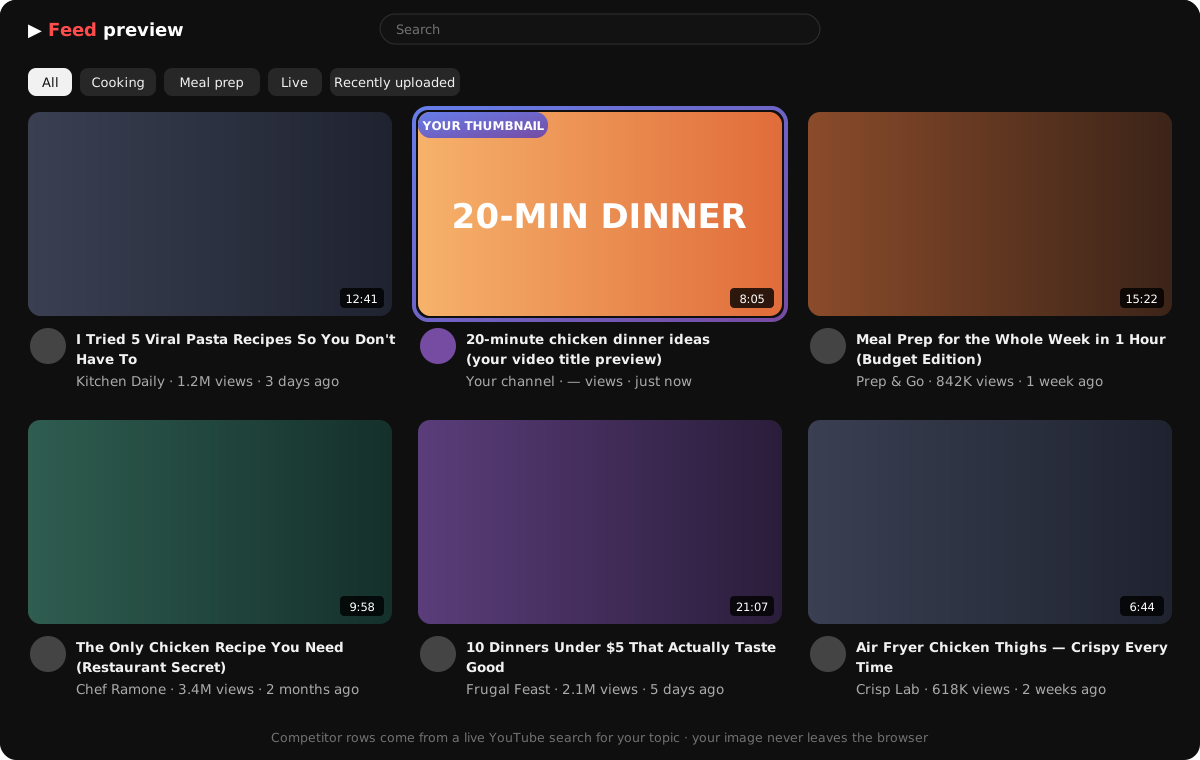
None of those is how a thumbnail is actually judged. A thumbnail is never seen alone. It's seen in a grid, next to nine other videos about the same thing, at the size of a postage stamp, by someone scrolling with their thumb. The only honest test is to put your image into exactly that situation before you publish — and that's what VidAI's free Thumbnail competitor tester does, in your browser, in about a minute.
In this guide
- Why "does it look good?" is the wrong question
- What the tester does (and what it never does with your images)
- The 3-step walkthrough: images → topic → opponents → feed
- How to read the result: the six checks
- The size nobody designs for: 168×94 and 120×68
- Demo mode vs the full tester
- Five before/after patterns that win the click
- FAQ
Why "does it look good?" is the wrong question
YouTube doesn't show your thumbnail; it shows a row. The viewer's eye lands on the row, compares, and picks — in about a second. So a thumbnail doesn't need to be beautiful. It needs to win its neighbours: more contrast than the video to its left, a clearer promise than the one below, text that survives shrinking to a phone.
That means you can't evaluate a thumbnail without knowing who it sits next to. A dark, moody thumbnail is brilliant in a row of bright ones and invisible in a row of dark ones. Red text pops until the three videos around you also use red text. "Test against competitors" isn't a nice-to-have; it's the test.
What the tester does
vidai.help/thumbnail_tester builds a realistic YouTube-style home feed around your thumbnail:
- You drop 1–5 candidate images (JPG, PNG, or WebP, up to 2 MB each).
- You describe your topic in a sentence. The tester searches YouTube for similar, high-performing videos — the actual competition your video will face.
- You pick the opponents (up to 11 slots; it fills gaps with sample thumbnails if you choose fewer).
- It renders the feed: your thumbnail, highlighted with a ring, among the real ones — titles, channel names, view counts and all.
And one thing it deliberately does not do: your images never leave your browser. Nothing is uploaded to VidAI's servers — not the thumbnails, not your topic, not your ideas. The only network calls go to YouTube, to fetch the competitors' public thumbnails and metadata. Your wizard progress is saved in the browser too, until you press Start over.
It's free. Without signing in you get a demo feed with mock competitors, to see how it works. Sign in with Google (also free) and you get the full tester with live YouTube search and the complete wizard.
The 3-step walkthrough
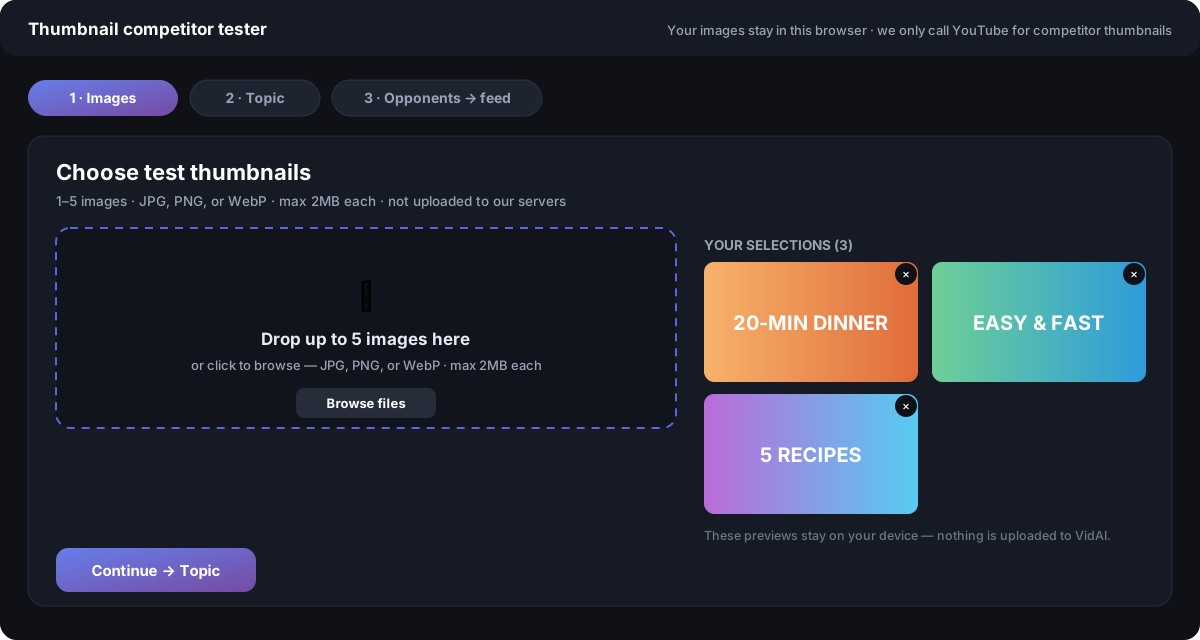
Step 1 — Images. Drop up to five candidates onto the drop zone (or click Browse files). Make them real contenders — the versions you're actually torn between. Each preview has a ✕ to remove it. The hint under the heading is literal: not uploaded to our servers.
Step 2 — Topic. Write what the video is about the way a viewer would search for it: "20-minute chicken dinner ideas", not "my cooking video #14". The tester runs a YouTube search for similar, high-performing videos and shows up to 20 results; uncheck any that don't belong. If your niche is thin, it broadens the search automatically, and you can always paste specific YouTube URLs of the channels you're really competing with. Results are cached in your browser for 24 hours — Refresh search queries YouTube again. You can also type your video title here so the feed preview shows your title under your thumbnail, exactly as it will appear.
Step 3 — Opponents → feed. Choose which of the found videos surround you. The grid has 11 competitor slots; select fewer and the tester fills the rest with sample thumbnails so the feed still looks like a feed. Press Continue to feed.
The feed. Now look — but look the way a viewer does. Don't study your thumbnail. Scan the grid for one second and notice where your eye went first. If it wasn't your video, you have your answer, and you have it before publishing instead of after a week of weak click-through.
Swap in the next candidate (the previews are still there) and compare. Two minutes, five variants, a decision you can defend.
How to read the result: the six checks
Run each candidate through these while it sits in the grid:
- Contrast against the neighbours. Is your thumbnail lighter or darker, warmer or cooler than the row? Different wins; similar disappears.
- Face or object size. If there's a face, is the expression readable at a glance? If it's an object, is it one object? Busy thumbnails lose to simple ones every time.
- Text: four words, maximum. Can you read it without leaning in? Does it add something the title doesn't already say? If the text repeats the title, delete it.
- Colour clash with the row. If three competitors use red, your red vanishes. Pick the colour the row isn't using.
- The promise is clear. Thumbnail plus title together should make one obvious promise. Type your title in Step 2 and check the pair, not the picture.
- It reads at 120×68. Which brings us to the size nobody designs for.
The size nobody designs for
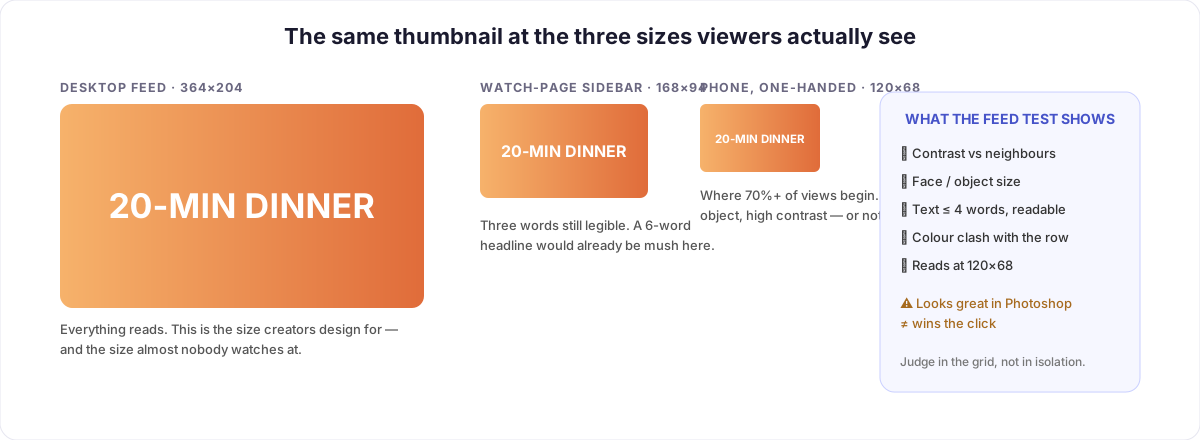
Creators design thumbnails at 1280×720 and judge them at 1280×720. Viewers see them at 364 pixels wide on a desktop feed, 168 in the watch-page sidebar, and about 120 on a phone — where most views start. Text that is crisp in your editor becomes a grey smudge at 120×68. That's why the rule is four words, why one face beats three, and why the tester's grid is more truthful than any full-screen preview: it shows the image at the size it will actually be fought over.
A cheap extra check: lean back from your screen until the grid is blurry. The thumbnails that still read are the ones that work.
Demo mode vs the full tester
| Demo (no sign-in) | Full tester (free, signed in) | |
|---|---|---|
| Your own thumbnails | ✅ up to 5, local only | ✅ up to 5, local only |
| Competitors | Mock sample videos | Live YouTube search for your topic |
| Opponent selection | — | Pick from up to 20 results, paste URLs |
| Title preview | — | ✅ your title under your thumbnail |
| Progress saved | — | ✅ in your browser, until Start over |
| Price | Free | Free |
The demo answers "how does this work?"; the full tester answers "will my thumbnail win my niche?". Signing in takes one Google click and costs nothing — it's there so the live YouTube search isn't abused by bots.
Five before/after patterns that win the click
Patterns we see again and again when creators run candidates through the grid:
| Before | After | Why it wins |
|---|---|---|
| A sentence of text across the image | 3 words, huge, one colour | Readable at phone size; stops competing with the title |
| Dark photo, dark text | Bright background, dark subject | Contrast against a row of dark competitors |
| Full-body shot, tiny face | Face cropped to the shoulders, expression visible | Emotion reads at 120×68 |
| Same red-and-yellow as every competitor | The one colour the row isn't using | Your eye goes to the odd one out |
| Three objects, an arrow, a circle | One object, one arrow at most | Simplicity survives shrinking |
None of these are rules about beauty. All of them are rules about the row.
FAQ
Is the thumbnail tester really free? Yes. The demo needs no account; the full tester needs a free Google sign-in and has no paid tier.
Are my thumbnails uploaded anywhere? No. They stay in your browser's memory. VidAI's servers never receive the images, the topic, or your selections. Close the tab and they're gone (unless you saved progress, which is also local).
Where do the competitor thumbnails come from? From YouTube's public search results for your topic — the same videos your viewer would see. The tester fetches their public thumbnails and metadata.
Can I test more than one thumbnail at once? Yes — up to five per session. Run the feed, swap the highlighted slot to the next candidate, compare.
Does it tell me which thumbnail is best? No — and be suspicious of anything that claims to. It shows you the truth of the grid; your eye does the rest. The six checks above are how to read it.
Does it work in other languages? The tester is available in English and Ukrainian (/uk/thumbnail_tester). Your competitors are whatever YouTube returns for your topic, in whatever language you search.
What size should my thumbnail be? 1280×720 pixels (16:9), under 2 MB, JPG/PNG/WebP — YouTube's requirements, which are also the tester's limits.
Stop guessing. Open the thumbnail tester — drop your candidates, describe your topic, and see which one wins the row. And once the thumbnail wins the click, make sure the title wins in every language too: translate your video into 90+ languages in one click.



