
Which Languages Should You Translate Your YouTube Videos Into? Reach vs. Revenue

Prefer watching? The whole job for a silent channel — settings, one click, the cost, which languages first — in 3 minutes.
You can translate a YouTube video into 91 languages. You almost certainly shouldn't translate it into 91 languages — at least not first. This is the decision guide: the two completely different answers to "which languages?", the exact lists behind VidAI's Top 20 and 💰 Top 20 RPM presets, why they barely overlap, and how to pick using evidence from your own channel instead of a guess.
🇺🇦 Читати українською: Які мови обрати для перекладу відео на YouTube: охоплення чи дохід
Ask a creator which languages they should translate into and you'll usually get a shrug, then "Spanish, I guess?". It's the single biggest thing standing between a channel and a global audience — not the translating, which is now one click, but the choosing.
The reason it's hard is that "which languages?" is really two questions with two different answers:
- Which languages reach the most people?
- Which languages earn the most money per 1,000 views?
They are not the same list. They're barely the same list.
The two lists, side by side
These are the exact sets behind VidAI's quick-pick buttons, read from the live API today.
| # | Top 20 — by speakers (reach) | 💰 Top 20 — by RPM (revenue) |
|---|---|---|
| 1 | English | English |
| 2 | Chinese | German |
| 3 | Spanish | Japanese |
| 4 | Arabic | French |
| 5 | Hindi | Korean |
| 6 | Bengali | Dutch |
| 7 | Portuguese | Norwegian |
| 8 | Urdu | Swedish |
| 9 | French | Danish |
| 10 | Malay | Finnish |
| 11 | Swahili | Italian |
| 12 | Indonesian | Spanish |
| 13 | Russian | Portuguese |
| 14 | Persian | Polish |
| 15 | Punjabi | Czech |
| 16 | Hausa | Chinese |
| 17 | Japanese | Turkish |
| 18 | Telugu | Arabic |
| 19 | German | Hebrew |
| 20 | Tamil | Indonesian |
Look at what's in one column and not the other. Bengali, Urdu, Swahili, Punjabi, Hausa, Telugu, Tamil — enormous audiences, no equivalent in the revenue list. Norwegian, Swedish, Danish, Finnish, Dutch, Czech, Hebrew — small populations, high on the revenue list.
Norway has around five million people. Bengali has well over two hundred million speakers. On a monetized channel, a thousand Norwegian views can be worth several times a thousand Bengali views. Both facts are true, and which one matters depends entirely on what your channel is for.
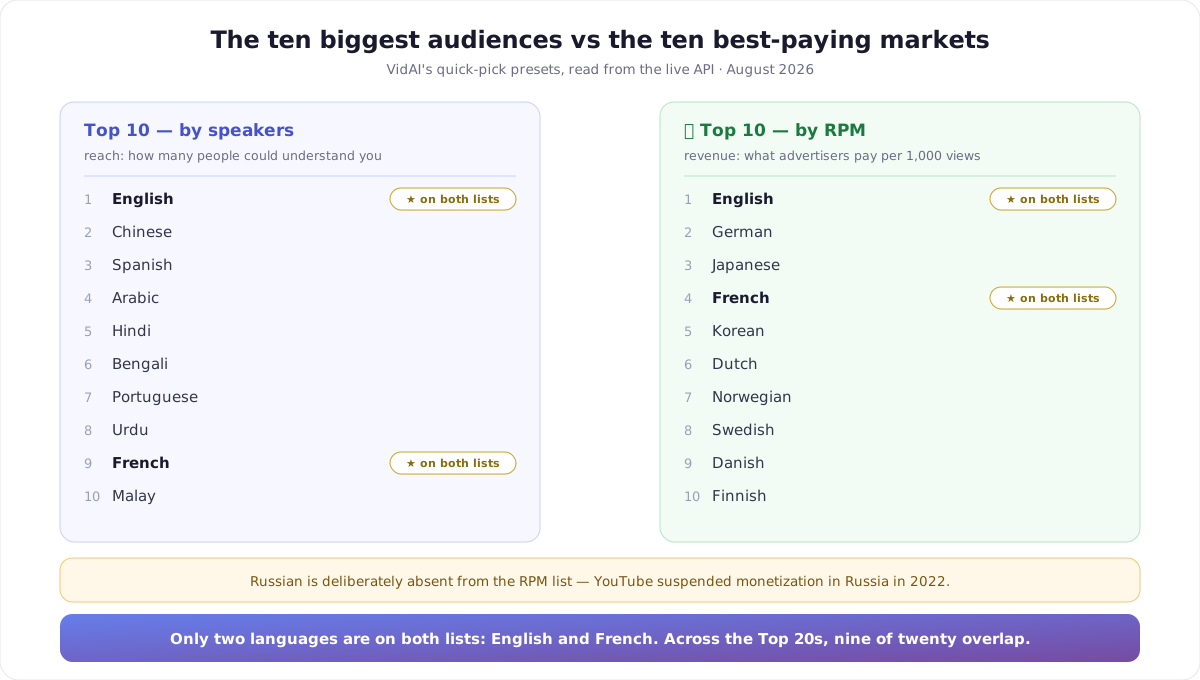
Narrow it to the top ten of each and the gap is even starker: only two languages are on both lists — English and French. Everything else you'd pick for reach, you would not pick for revenue, and vice versa.
Why the revenue list looks like that
YouTube's ad RPM — revenue per 1,000 views — is set by what advertisers will pay to reach that viewer. Advertiser budgets follow purchasing power far more closely than they follow population. So the top of the RPM list is the English-speaking world, then Germany and Japan, then France and Korea, then the Netherlands and the Nordics: small countries, very high advertiser value.
Two honest caveats about this list, because they matter:
It's a curated business list, not live data. VidAI doesn't have a feed of real-time RPM by language — nobody outside Google does. The order reflects the consistently-reported top YouTube ad markets. It's a good default; it is not a measurement of your channel.
Russian is deliberately excluded. YouTube suspended monetization in Russia in 2022, so despite a very large audience its ad RPM is effectively zero. It stays in the reach list, where it belongs, and is absent from the revenue one.
And a third thing worth internalising: your RPM varies more by niche than by language. A finance channel in Portuguese can out-earn a prank channel in German. Treat the list as a starting order, then let your own analytics correct it.
Four strategies — pick the one that matches your channel
1. Revenue-first — 💰 Top 10 RPM
Use it if: your channel is monetized through AdSense, your content travels well (no culture-specific jokes or local references), and you want the fastest measurable return.
Ten languages, the highest-paying markets, done. This is the most common right answer for a monetized channel that has never translated anything.
2. Reach-first — Top 10 or Top 20 by speakers
Use it if: ad revenue isn't the point. You're selling a product or a course, growing a community, building a brand, or you're in music, where views themselves are the asset and RPM is a footnote.
As you toggle languages, VidAI's picker adds the audience up live — Target audience: ~4.2B speakers across 10 languages. That total isn't a promise of viewers; it's the size of the room you're now allowed to speak in.
3. Evidence-first — let your own analytics choose
This is the best strategy and almost nobody uses it, because it takes ten minutes instead of one click.
In YouTube Studio → Analytics → Audience → Top geographies you can already see where your viewers are — before translating anything. Very often there's a country in that list that has no business being there: a channel in English with 8% of its watch time in Brazil, or in Poland, or in Indonesia. Those are people fighting through a language barrier to watch you. They're the cheapest conversions you will ever make.
Same for Subtitles in the Analytics reports: if viewers are already turning on subtitles in a language, that language is not a guess.
Translate into what your channel already half-has. Then use a preset to fill out the rest.
4. The practical default — both, in that order
What most channels should actually do:
- Start with 💰 Top 10 RPM — the revenue floor.
- Add the two or three languages your analytics already show real traffic from, even if they're low-RPM.
- Publish, wait a few weeks, and look at what moved.
- Widen with Top 20 once you know translation works for your content.
Where the buttons are
The language set lives in your VidAI settings and every translation uses it:
- vidai.help → My Settings → Translation → Languages. The five quick-picks are there: Top 10, Top 20, 💰 Top 10 RPM, 💰 Top 20 RPM, Select all. Under them, the running audience counter; under that, all 91 languages with individual toggles.
- Per channel. If you run several channels, each can carry its own language set instead of inheriting the global one — a gaming channel and a Ukrainian-language vlog shouldn't be translating into the same twenty languages.
- The Channel Localization form has the same presets, restricted to the languages YouTube will accept for a channel name and description.
Two behaviours to know: a preset replaces your current selection rather than adding to it (pick the preset first, then hand-toggle extras), and changing the set only affects future translations — videos you already translated keep the languages they were translated into.
What it costs to be wrong
Very little, which is the point. Translation is charged per language — roughly one credit per title plus one per 300 characters of description, per language — so a bigger list costs more, but a wrong list costs only that. Nothing breaks, nothing has to be undone, and if a language turns out to be dead weight you simply stop including it.
The one thing that is genuinely expensive is doing nothing while the decision feels hard. Twenty languages chosen imperfectly beats two languages chosen perfectly.
A note on the language that isn't on either list: yours
If you make content in a language other than English, there's a move that beats both presets: translate into English first. It's simultaneously the largest reach language and the highest-RPM one — the only entry at the top of both columns. For a Ukrainian, Polish, Portuguese or Indonesian channel, English is not "another language", it's the multiplier.
FAQ
How many languages should I translate into? Ten is a good first commitment — enough to see a signal in your analytics, small enough to review. Twenty once it's working. All 91 only when translation has already proven itself for your content.
Does translating a title actually get me views in that country? It makes you eligible. YouTube can now match your video to searches and recommendations in that language, and a viewer who sees a title they understand is far likelier to click. It doesn't create demand that wasn't there — which is why the analytics-first strategy beats guessing.
Is the RPM list based on real data? It's a curated ordering built from the consistently-reported highest-paying YouTube ad markets, not a live RPM feed — no such public feed exists. Use it as a sensible default and let your own revenue data refine it.
Why isn't Russian in the RPM list? YouTube suspended monetization in Russia in 2022, so its ad RPM is effectively zero. It's still in the reach list, where audience size is what counts.
Can different channels have different language sets? Yes. Each channel can override the global selection, so a multi-channel operation isn't forced into one list.
If I change my languages, do old videos update? No. The change applies to new translations. To add a language to an older video, translate that video again with the new set.
Should I translate subtitles into the same languages? Subtitles are a separate, free flow — YouTube's own Auto-translate does that work, so the cost calculus doesn't apply and you can be much more generous with the list. Here's how.
Next: Translate a video into 90+ languages · Made a mistake in all of them? Fix it in 30 seconds · Install VidAI



