
AI YouTube Descriptions: Short vs Full, What Each Writes, and What the AI Must Never Touch (Insert, Don't Replace)

VidAI writes YouTube descriptions two ways — a Short Description (About) for 1 credit and a Full Description (Template) for 20 that builds hashtags, hook, summary, chapters, links, CTA and a keywords line from your subtitles. Here is exactly what each reads and writes, what they never read (your current description), and the Insert-not-Replace rule that keeps your links, timestamps and disclosures exactly as you wrote them.
🇺🇦 Читати українською: AI-описи для YouTube: короткий чи повний — і чого AI не має чіпати
A YouTube description does two jobs at once: it tells search what the video is about, and it carries the things you can't afford to lose — affiliate links, sponsor disclosures, the chapter list, your social handles. Any "YouTube description generator" that ignores the second job is dangerous, because one careless click overwrites months of careful links. This guide explains how VidAI's two description generators work, from the code, and the one habit that keeps your existing description safe.
The two generators
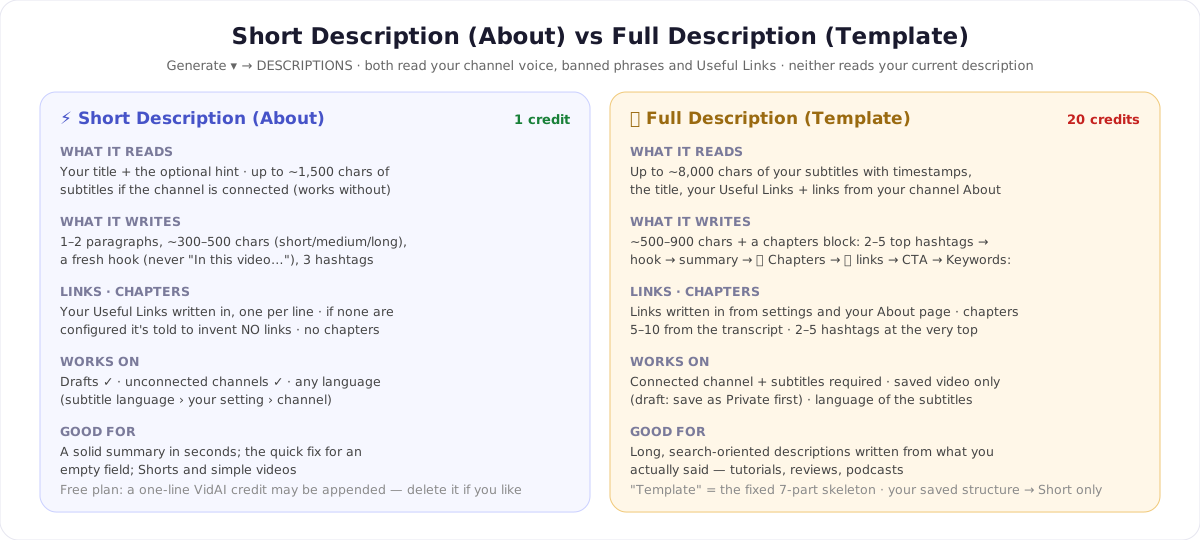
Both live in YouTube Studio under 🪄 Generate ▾ → DESCRIPTIONS. Both read your channel profile — voice, audience, banned phrases — and your Useful Links. Neither reads the description you already have (more on that below).
⚡ Short Description (About) — 1 credit
Reads your title and the optional hint you type ("tutorial, SEO-focused, funny tone…"), plus up to ~1,500 characters of your subtitles when the channel is connected — and it works fine without a connection, and on drafts. It writes 1–2 paragraphs (about 300–500 characters on the default medium setting; short and long shift that), opens with a hook that is explicitly forbidden from being "In this video…", "Dive into…" or "Welcome…", and adds three hashtags. If you've configured Useful Links, they're written in one per line; if you haven't, the model is told in capitals to invent no links, handles or placeholder URLs at all. Written in the subtitles' language, or the language you've set. It never writes chapters — that's the Chapters button.
On the free plan a one-line VidAI credit may be appended to short descriptions; delete it if you prefer.
📚 Full Description (Template) — 20 credits
Needs a connected channel and a video with subtitles, saved at least once (on a draft the item says Save your draft first to unlock — save as Private, reopen from Content). It reads up to ~8,000 characters of your transcript with timestamps and writes a complete, structured description — the "Template" is this fixed skeleton:
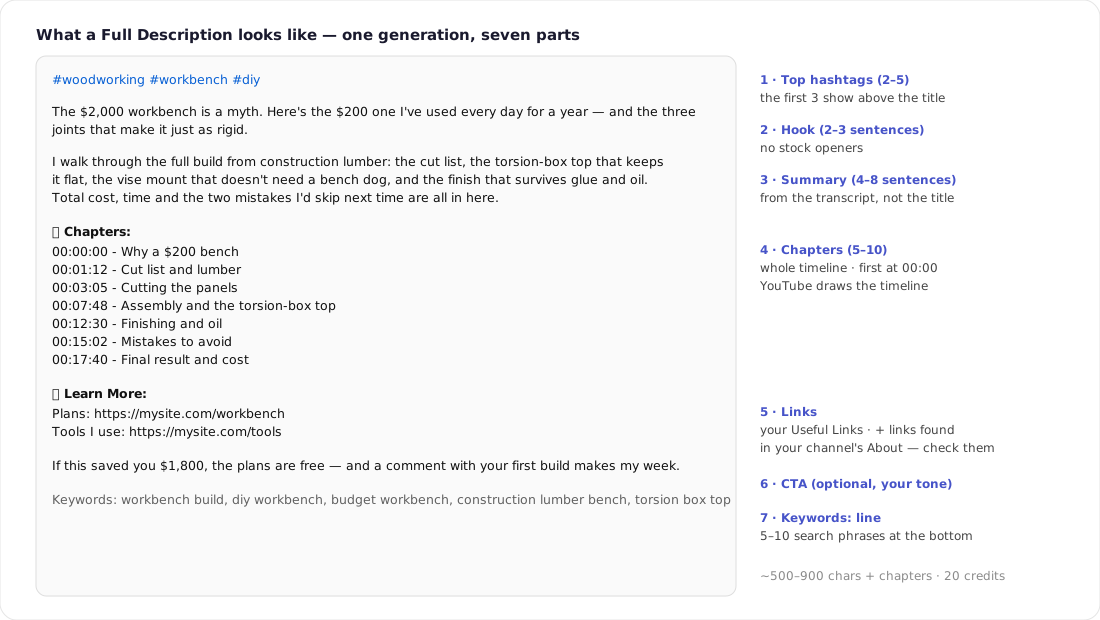
- 2–5 hashtags at the very top (the first three show above your title — why that matters).
- Hook, 2–3 sentences.
- Summary, 4–8 sentences, from what you actually said.
- 📚 Chapters: 5–10 covering the whole timeline, first at
00:00:00. - 🔗 Learn More: your Useful Links — and links VidAI finds in your channel's About page.
- CTA in your tone, or none (a setting).
- Keywords: a bottom line with 5–10 search phrases.
Target length is ~500–900 characters plus the chapters block (settings: short ≈ 300–500, long ≈ 900–1,500). Language follows the subtitles unless you force one. One caveat on the name: the "Description Template" you can save in your web settings (Preferred Description Structure) is used by the Short generator only; the Full generator always uses its own seven-part skeleton.
What the AI never touches — because it never sees it
Here is the fact that decides how you should use both buttons: neither generator reads your current description. They write a fresh text from the title, the hint, the transcript and your settings. Nothing in VidAI's pipeline "preserves" your links or timestamps, because the AI never had them. Whether they survive is decided by which button you click in the result panel:
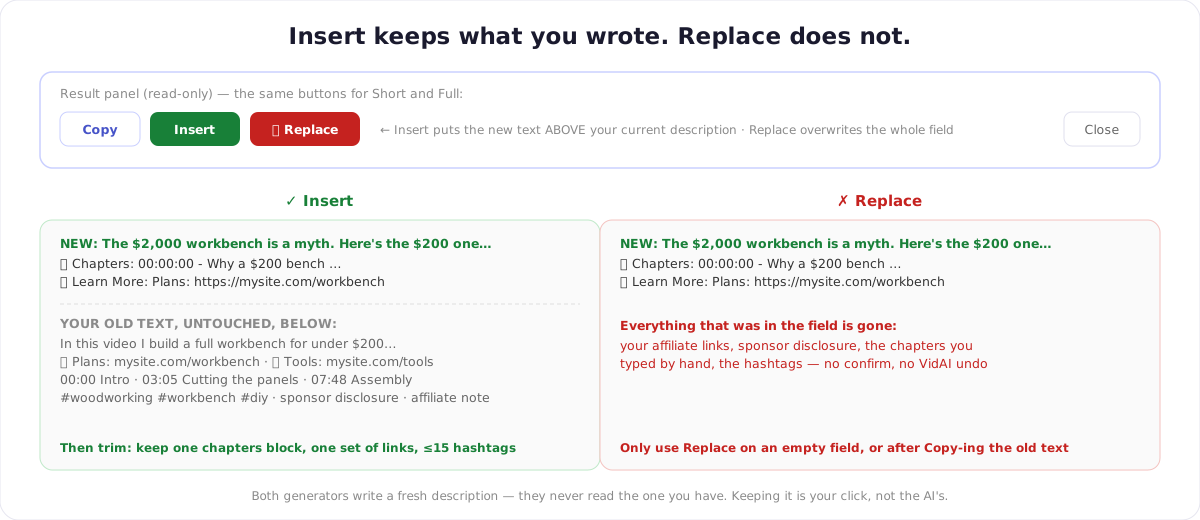
- Insert puts the generated text above your existing description and leaves everything below it exactly as it was. This is the safe default.
- 🔄 Replace overwrites the entire description field. No confirmation, no VidAI undo (your browser's ⌘Z/Ctrl+Z may still work if you act immediately). Use it only when the field is empty or you've just copied the old text somewhere.
- Copy puts the text on your clipboard; Close discards it.
So the rule is simple: Insert, then trim. After inserting a Full Description you'll typically have two chapter blocks (yours and the new one) and two sets of links — keep one of each, keep the total hashtags under 15, and save. Thirty seconds of editing, and nothing you built is lost.
Links: make them come from you
The AI writes links in the new description only if it has them. Give it yours:
- ⚙ settings → Useful links (extension settings or vidai.help Settings → General): up to 10 entries with a label and a URL — a plain domain, an
@handleor an email all work and are normalised to proper links. Both generators write them in (toggle: Include links). - The Full generator additionally pulls up to five links it finds in your channel's public About text. That's usually helpful (your site, your socials) but it means links you didn't put in VidAI can appear — read the 🔗 block before saving, and delete what you don't want. The Short generator has a stricter rule: with no Useful Links configured, it is instructed to include no links at all.
- Check every URL after generation. Models occasionally mangle a link; VidAI strips markdown link syntax from Full Descriptions, which can drop a URL the model wrapped incorrectly. Your configured links in the settings are the reliable source; the generated text is a draft.
Timestamps and hashtags
- Chapters: Short writes none. Full writes its own 5–10 from the transcript,
HH:MM:SS - Title. If you already have chapters, Insert will give you two lists — keep whichever is better. YouTube needs the first at00:00, at least three, ascending, 10 s+ each (the full rules). - Hashtags: Short adds three; Full puts 2–5 at the top. If your old description had hashtags too, make sure the total stays under 15, or YouTube ignores them all.
Settings (per channel, every plan)
Style (auto / SEO / storytelling / minimalist), length (short / medium / long), CTA on/off, links on/off, custom instructions (up to 200 characters — "never mention prices, always end with a question"), emoji use (auto / always / never), language override, persona and banned phrases. Available to everyone; set once per channel.
Before you hit Save — 30 seconds
- One chapters block, first line
00:00. - One set of links, every URL yours and correct.
- Hashtags ≤ 15, best three first.
- Sponsor/affiliate disclosures still present.
- Total length under YouTube's 5,000 characters (Full + old text can exceed it; VidAI doesn't cap).
- Language and CTA match the channel.
What it costs
| Action | Credits |
|---|---|
| Short Description (About) | 1 |
| Full Description (Template) | 20 |
| Copy · Insert · Replace · editing | 0 |
| Running again (there's no regenerate button — use the hint box to steer) | same again |
FAQ
Does VidAI keep my links and timestamps? Only if you use Insert (or Copy and paste by hand). The AI writes a new description without reading the old one; Replace deletes the old one.
Why does Full Description need my channel connected? It reads your subtitles through YouTube's API on your behalf. The short one works from the title and hint alone.
Which one should I use? Full for tutorials, reviews, podcasts and anything long where the transcript carries the substance; Short for quick fills, Shorts, and when you'll write the rest yourself.
Can I get a different version? Add a hint ("more technical", "shorter hook", "mention the giveaway") and generate again; each run costs the same.
Does it write in my language? Yes — the subtitles' language by default, or the language you set per channel.
Try it on your next upload: Install VidAI → Generate ▾ → pick Short or Full → Insert, then trim.



