
Why VidAI's Titles, Tags and Descriptions Sound Like Your Channel: Channel Intelligence Explained (What's in It, Who Reads It, How to Edit It)

Channel Intelligence is the context layer behind VidAI's AI titles, descriptions, tags, keywords, hashtags, chapters, playlists and social posts: a per-channel profile built from public YouTube data in about three seconds, an AI-written summary of what the channel is, and your own notes on top. Here is exactly what's in it, which features read which parts, how to see and edit it, and what it costs (nothing).
🇺🇦 Читати українською: Чому назви, теги й описи від VidAI звучать як ваш канал — Інтелект каналу
Every AI title generator can write a title. The difference between "AI-sounding" and "sounds like the creator I follow" is whether the model knew anything about the channel before it wrote. Most tools know nothing: they see one video's title and transcript and guess the rest. VidAI reads the channel first — and this post opens that box so you know what it's using, what it isn't, and how to make it better in five minutes.
The profile has three layers — and yours wins
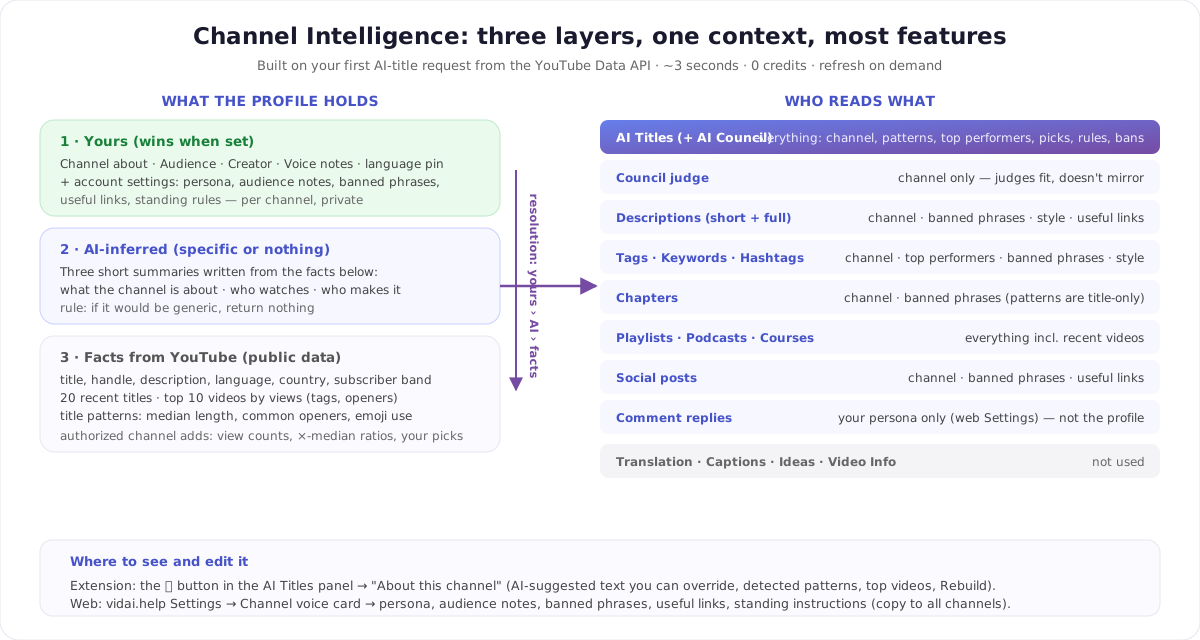
Layer 3 — facts from YouTube. Built from the YouTube Data API, the same public data anyone can see on your channel page: title, handle, description, language, country, subscriber band, video count, topic categories, your 20 most recent video titles, your top 10 videos by views (with their tags and how their descriptions open), and a few title patterns computed from those titles — median length, the openers you use most ("How I…", "I Built…"), how often you use emoji or questions. Patterns are plain arithmetic, not AI: cheap, deterministic, and good enough to tell a model "this channel writes 50-character titles without emoji".
Layer 2 — AI-inferred. From those facts, a model writes three short summaries: what the channel is about, who watches it, who makes it. The instruction it's given is worth quoting, because it's the opposite of what most generators do: "Be specific to this channel. If you'd write something generic ('a YouTube channel about music'), return nothing for that field." An empty field is better than a bland one — a bland one would pull every title toward bland.
Layer 1 — yours. Anything you type overrides the layers below: Channel about, Audience, Creator, Voice notes ("what works / what doesn't"), and a language pin if YouTube guesses your channel's language wrong. On top of that, your account settings add the parts no API can know: a persona, audience notes, banned phrases, useful links (the evergreens you want appended to descriptions), and standing instructions that apply to every generation.
Resolution is simple: your text › the AI's text › the raw facts. And a rebuild never touches your text — "Any text you typed yourself stays unchanged."
How it gets built — and when
You don't set it up. The first time you ask VidAI for AI titles on a channel, the profile is built automatically in the background, in about three seconds, and costs 0 credits. It works on any public channel — no authorization needed.
Authorizing the channel (the same one-time Google consent that enables Fast API translation) makes the profile richer: view counts, so VidAI can rank your top performers and label them "2.4× channel median"; and learning from your picks — titles you accepted from earlier suggestions become examples, titles you dismissed become things to avoid. Without authorization VidAI works from public data only: no view counts, no performance ratios, no learning from your picks.
Refreshing is on you. The profile is built once and then used as-is; it does not expire. When your channel pivots, or after a run of new uploads, open the profile and click ↻ Rebuild from YouTube Data API — allowed once per 24 hours per channel to respect YouTube's API quotas. Your own notes survive every rebuild.
Where you see it (and fix it)
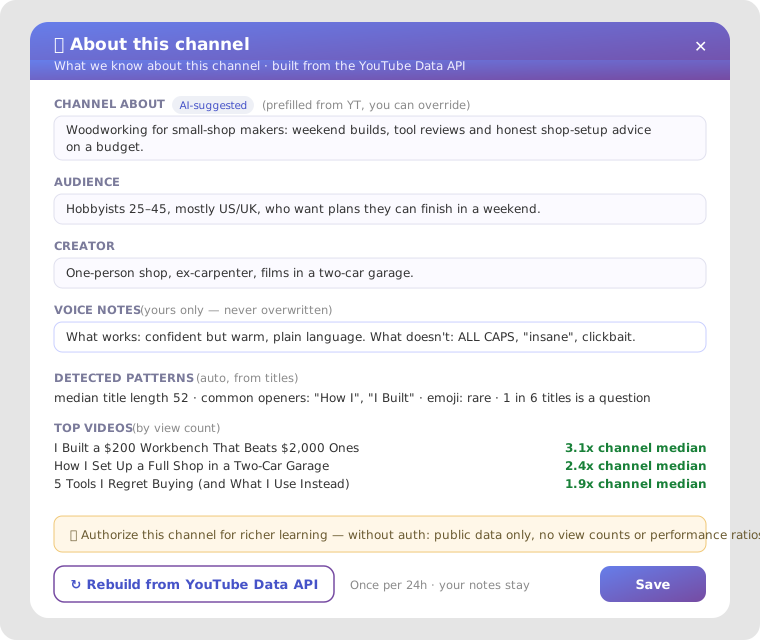
In the extension: open AI Titles on any video in YouTube Studio and click the ⓘ button — "What we know about this channel". The panel shows the AI-suggested texts (marked AI-suggested — prefilled from YT, you can override), your voice notes, the detected patterns, your top videos, and the Rebuild button. Edit any field and save; clear a field and the AI suggestion (or the raw fact) comes back.
On the web: vidai.help Settings → the Channel voice card — "Voice and context every AI feature reuses — titles, descriptions, chapters, tags." That's where the account-level parts live: Channel persona (1–2 lines on your voice and tone, e.g. "Friendly tech reviewer, concise, a little witty"), Audience notes ("Beginners learning to code, mostly 18–34"), banned phrases, useful links, default instructions. Settings are per channel; if you run several, fill one and use copy to all channels, then adjust.
Which feature reads what — the honest map
| Feature | What it reads from the profile |
|---|---|
| AI Titles (incl. the AI Council) | Everything: channel summary, what works, top performers with their ×-median, your recent picks, standing rules, hard-banned phrases, recently dismissed titles |
| Council judge | Channel summary only — it judges fit, it isn't trying to mirror you |
| Descriptions (short and full) | Channel, banned phrases, style inspiration, useful links |
| Tags · Keywords · Hashtags | Channel, top performers, banned phrases, SEO-style inspiration (how tags are scored) |
| Chapters | Channel + banned phrases only — title patterns are deliberately left out; they don't help name chapters |
| Playlists · Podcasts · Courses | Everything, including your recent videos (to see the channel's direction) |
| Social posts | Channel, banned phrases, useful links |
| Comment replies | Your persona from Settings only — replies answer the commenter, not the channel's title habits |
| Translation · Captions · Ideas · Video Info | Not used — translation preserves your text, it doesn't rewrite it |
So the accurate claim isn't "every output" — it's that every generation feature shares one channel context, replies use a lighter persona-only path, and translation leaves your words alone on purpose.
What the AI actually reads
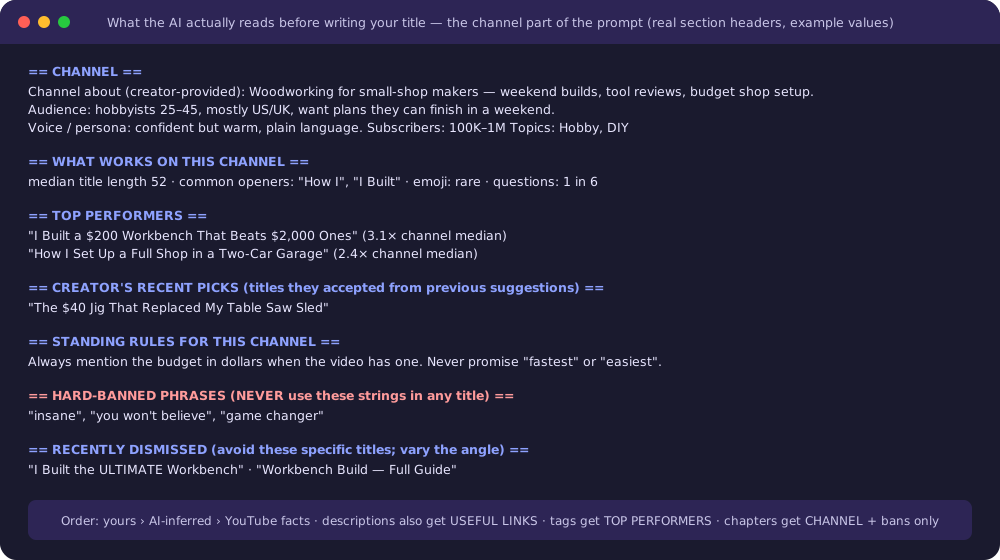
This is the part that makes outputs feel "yours". Before writing a title, the model gets a channel block with real section headers — here with example values:
Two details matter:
- Provenance is visible to the model. A line is labelled "Channel about (creator-provided)" or "(auto-inferred)", so your words carry more weight than a guess.
- Bans are hard. Banned phrases go in as "NEVER use these strings in any title", not as a suggestion. If "insane" is on your list, it will not appear.
Make it better in five minutes
- Write "Channel about" yourself — one specific sentence beats the AI's guess. "Woodworking for small-shop makers: weekend builds, tool reviews, budget shop setup" is worth more than "a channel about woodworking".
- Voice notes: what works / what doesn't. "Confident but warm, plain language. No ALL CAPS, no 'insane', no clickbait." This single field moves every title.
- Banned phrases. Every word you're tired of seeing in AI titles. They're enforced, not suggested.
- Useful links. Your newsletter, shop, Discord — appended to descriptions where they fit, never invented.
- Authorize the channel. Top performers with real ratios and learning from your picks are the two signals that make the biggest difference over time.
- Rebuild after a pivot. New niche, new format, 10 new uploads — click Rebuild so the facts catch up. Your notes stay.
Multi-channel creators and teams
The profile is per channel: your cooking channel and your travel channel each get their own facts, patterns and summaries, and VidAI picks the right one from the channel you're working in. Your account-level settings are also per channel, with a one-click copy. Notes typed in the About this channel panel are stored with the channel's profile, so a team working on the same channel with VidAI shares them; the persona in web Settings is tied to your account.
What's stored, what isn't
Stored: public channel facts, up to 30 recent video titles and ids, view counts and tags for the top 10, the computed patterns, three short AI summaries, and your own notes. Not stored and not read: your comments, YouTube Analytics, watch time, transcripts, or anything private — authorization adds freshness and view counts, not private data. Building and rebuilding never charges credits; the features that use the profile charge their normal price.
FAQ
Does Channel Intelligence cost credits? No. Building, rebuilding and editing it are free. AI Titles, descriptions, etc. cost what they always cost.
Do I have to set it up? No — it builds itself on your first AI-title request. Setting it well (the five-minute list above) is optional and worth it.
Why is a field empty? The AI returns nothing rather than something generic. Fill it in yourself — your text wins.
Does it refresh automatically? No. Click Rebuild when your channel changes (once per 24 h). Your notes are never overwritten.
Does it read my comments or analytics? No. Public channel data plus, if authorized, view counts and your own accept/dismiss choices.
Can VidAI learn from channels I admire? Yes — paid plans can add up to three inspiration channels, profiled the same way, with a hard rule to never copy their wording.
Open it on your channel: Install VidAI, open AI Titles on any video, click ⓘ.



