
Multilingual YouTube Tags: One 500-Character Box, Five Search Markets (How VidAI Scores and Localizes Tags)

Multilingual YouTube tags with VidAI: channel-aware tags scored 50–100 and rendered as localized search phrases in your language plus English, Spanish, Hindi, Portuguese and Arabic — fitted into YouTube's 500-character tag box so one video can surface in five search markets.
🇺🇦 Читати українською: Багатомовні теги YouTube: одне поле, п'ять ринків пошуку
YouTube gives you 500 characters of tags per video, and most creators spend them on one language — usually their own, sometimes English. Everyone else who searches for that topic in Spanish, Hindi, Portuguese or Arabic never sees the video, even when the title and description have been translated.
The obvious fix — translate your tags — doesn't work, because nobody searches in translations. A Spanish viewer doesn't type the literal Spanish of your English tag; they type the phrase Spanish speakers actually use. That's the gap VidAI's Multilingual tags are built for. This guide explains the two checkboxes next to the Tags button and what happens when you tick them.
Advanced Tags — what the first checkbox does
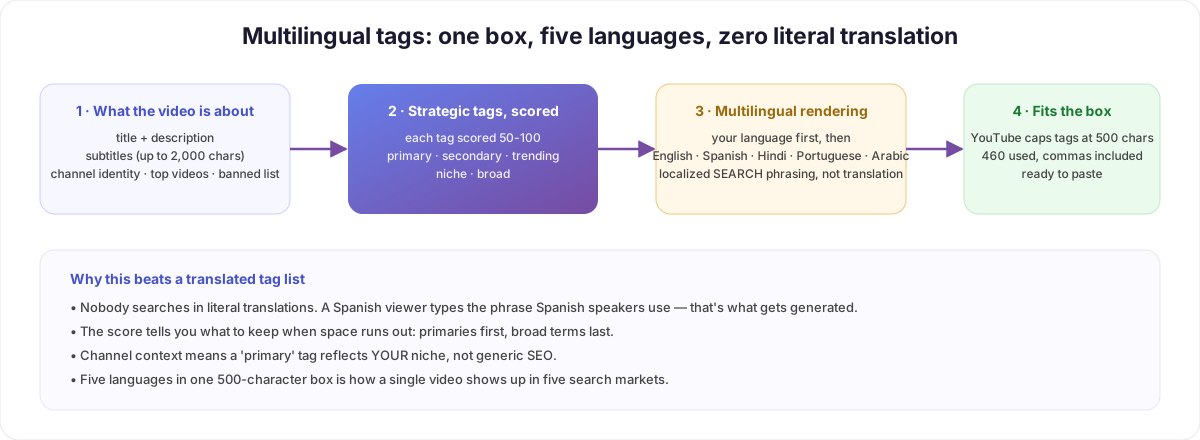
Standard tag generators read your title and guess. Advanced Tags reads considerably more:
- the title and description, plus the video's subtitles (up to the first ~2,000 characters) — so a tutorial gets tagged for what's said, not just what's promised;
- your channel profile — identity, your top-performing videos (proven signals for your niche), and your banned words;
- the video's category and language.
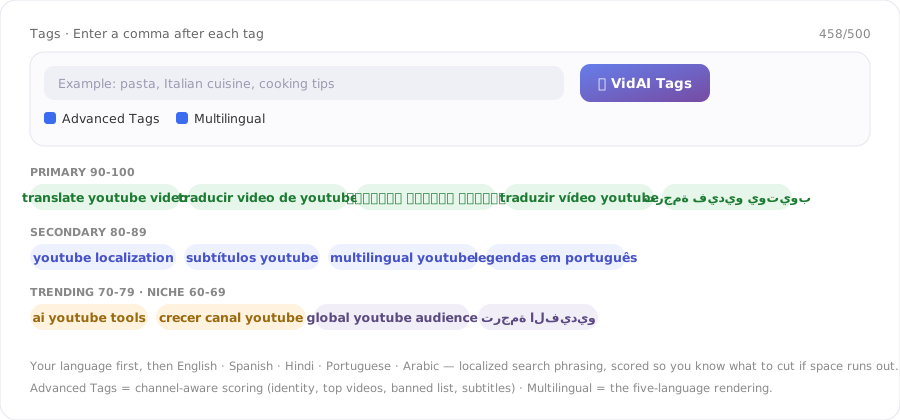
Then every tag gets an importance score from 50 to 100, in tiers:
| Score | Tier | What it means |
|---|---|---|
| 90–100 | Primary | core topic, high search volume, low competition |
| 80–89 | Secondary | related topics, good volume, moderate competition |
| 70–79 | Trending | current trends, viral potential |
| 60–69 | Niche | long-tail, specific audience |
| 50–59 | Broad | general terms, high competition |
The score is the practical part: when the box fills up, you know what to cut (broad first) and what must stay (primary). And because the channel profile is in the loop, a "primary" tag reflects your positioning — not the generic top of a keyword list.
Multilingual — what the second checkbox does
With Multilingual on, VidAI takes the same core concepts and renders them as localized search phrasing across the most-spoken languages: your video's own language first, then English, Spanish, Hindi, Portuguese and Arabic (the order roughly follows global speaker population).
Two things make this different from "translate my tags":
- Phrasing, not translation. Each language gets the terms people in that language actually search — a native query, not a word-for-word rendering.
- Budgeted for the box. YouTube caps tags at 500 characters total, commas included. VidAI works to a 460-character budget so the result pastes in without truncation — the five languages share one box on purpose.
When to use which
- Local channel, single-language audience: Advanced Tags only — all 500 characters in one language, scored.
- Translated titles and descriptions (see the 90-languages guide): Advanced + Multilingual — your metadata is already discoverable in those languages; the tags should be too.
- Evergreen tutorials and how-tos: always Multilingual. "How to" searches are the most language-diverse queries on YouTube.
Tags are a smaller ranking signal than title and description — YouTube says so itself — but they're a free one, and they matter most for exactly the case above: misspellings, synonyms, and searches in other languages for a video whose title is in one.
FAQ
Do multilingual tags hurt my ranking in my main language? No. Your own language comes first and keeps its primary tags; the other languages use the remaining budget. The score tells you what to trim if you want more room.
Can I pick the languages? The multilingual set is the global top five plus your video's language — chosen for reach. If you translate your videos into a specific set of languages, the title/description translation is where per-language control lives.
Why 460 characters and not 500? Commas between tags count toward YouTube's limit; the headroom guarantees a paste that never gets cut.
Does it work in YouTube Studio? Yes — the checkboxes sit next to the VidAI Tags button in the video's tag field; one click fills the box.
Give your next video five search markets: Install VidAI from the Chrome Web Store — and pair it with titles from the AI Council for the full package.



