
Save the YouTube Videos That Inspire You — in One Click: Introducing the VidAI Ideas Board (Beta)

Introducing the VidAI Ideas board (beta): save any YouTube video that inspires you with one click on 💡 Idea, keep it in workspaces with AI-suggested names, see its real stats, tags and top keywords on a private board at vidai.help/ideas, and copy a clean brief for ChatGPT or Claude. Saving is free. Here's exactly what it does today — and what's still coming.
🇺🇦 Читати українською: Зберігайте YouTube-відео, що надихають, — одним кліком: дошка Ідей VidAI
Every creator has the same broken system for inspiration: a "Watch later" list that's actually "watch never", screenshots in a camera roll, links pasted to yourself. The video that made you think "I should do my version of this" is gone by the time you sit down to plan. VidAI's Ideas board is built for that exact moment — it's been quietly available to VidAI users for a while, and this post is its proper introduction.
What it is, in one paragraph
While you browse YouTube, VidAI adds a small capsule next to the channel name on every watch page: 🎬 Info · 💡 Idea · 💰 Monetized. One click on 💡 Idea saves the video — with a frozen snapshot of its title, description, thumbnail, channel, stats and tags — to a workspace on your private board at vidai.help/ideas. There you can group, search, sort, move and bulk-select ideas, open any of them to see its top keywords next to its real numbers, and Copy for AI a structured brief to paste into your favourite assistant. Saving costs nothing and works on any public video by anyone.
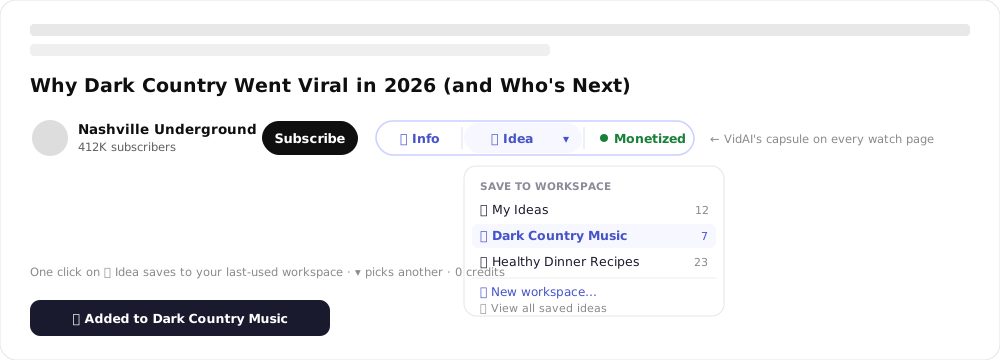
Saving: one click, or one click and a choice
- 💡 Idea saves straight to the workspace you used last (the first time: My Ideas). The button flips to ✅ Added and a toast confirms "Added to Dark Country Music". Click again on a video that's already there and nothing duplicates — the board keeps one copy per workspace.
- ▾ opens the picker: choose any workspace (it saves immediately), or ➕ New workspace….
- New workspace asks VidAI to suggest a themed name from the video you're saving — "Dark Country Music", "Budget Tech Builds" — which you can edit before Create & save. That suggestion is the one thing on the board that uses AI, and it costs 1 credit (charged when the suggestion is fetched; if you're out of credits you simply get the video's category as the name instead).
- The Video Info panel (🎬 Info) has the same 💡 Save to Ideas control in its footer with a workspace dropdown — handy when you're already reading a video's tags and monetization status.
It works on regular watch pages for any channel's videos — competitors, idols, the weird niche that's suddenly exploding. Shorts aren't covered yet.
What gets saved — a snapshot, on purpose
Each idea stores the video as it was when you saved it: title, full description, thumbnail, channel, category, views, likes, comment count, duration, publish date and up to 50 tags. Views drift and titles get edited; the snapshot keeps the version that caught your eye, so later you can ask "what did this look like when it was winning?". From the title, description and tags VidAI also computes the video's top keywords by frequency — the words the creator leaned on most.
The board
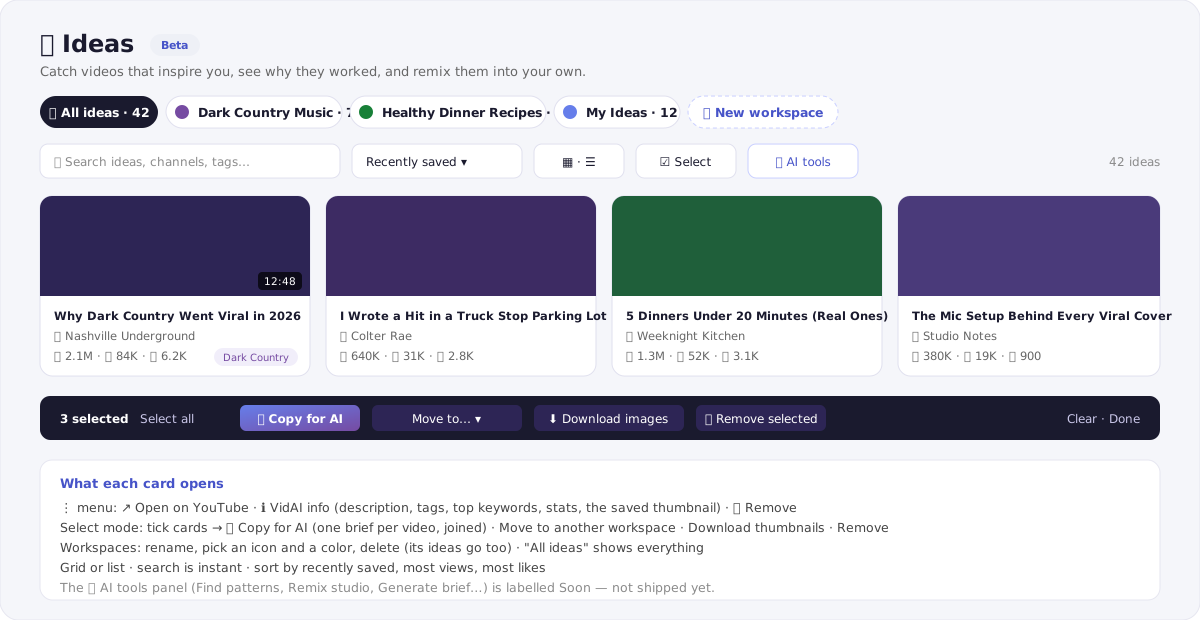
- Workspaces are your folders — by niche, by series, by project, whatever you like. Rename them, give each an icon and a colour, delete one (its ideas go with it). All ideas shows everything across workspaces, and a video can live in several workspaces at once.
- Find things fast: instant search across titles, channels and tags; sort by recently saved, most views or most likes; grid or list, remembered between visits.
- Each card shows the thumbnail, duration, title, channel and 👁 👍 💬 counts. Its ⋮ menu opens the video on YouTube, opens VidAI info (description, tags, top keywords, stats, the saved thumbnail) or removes it.
- Select mode turns the board into a batch tool: tick cards or Select all, then ✨ Copy for AI, Move to… another workspace, Download images (the thumbnails, for a swipe file) or Remove selected.
Everything is private to your account. Nothing you save is visible to anyone else, and nothing is changed on YouTube.
Copy for AI — the part that turns saving into learning
The reason to keep ideas structured is to ask questions of them. Copy for AI puts a clean brief on your clipboard for one video or a whole selection:
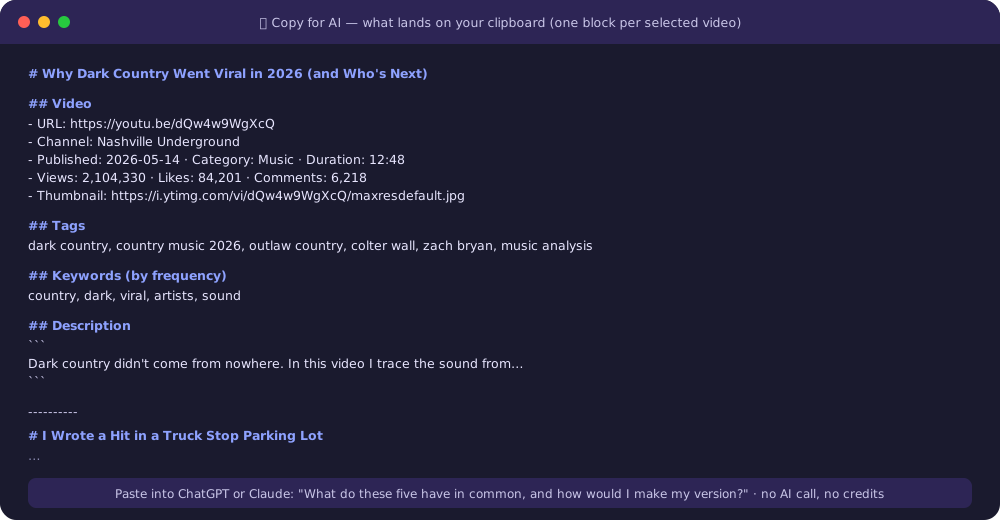
Title, link, channel, date, category, duration, the numbers, a direct thumbnail link (so an image-capable model can critique the cover), tags, keywords, and the full description — one block per video, separated. Paste five of them into ChatGPT or Claude and ask "what do these have in common, and what's my version?" — that's a research session that used to take an afternoon of tab-switching. Copy for AI is plain formatting, not an AI call, so it's free and instant. (It pairs naturally with VidAI's Copy for AI button in Studio for your own videos.)
Three ways creators use it
- The swipe file. Every thumbnail or hook in your niche that made you click goes in a workspace. After twenty, patterns are obvious — and Copy for AI makes the model say them out loud.
- Planning a series. Save the best existing videos on a topic into one workspace, sort by views, and you have a map of what's been done, what did numbers, and where the gap is.
- Competitor watch. A workspace per channel you learn from; when they post something that works, save it with the stats frozen at that moment.
Where to find it
- vidai.help/ideas — bookmark it; there's no menu entry yet (it's a beta).
- The VidAI popup in Chrome → 💡 Saved Ideas.
- The ▾ picker on any watch page → 🔗 View all saved ideas, and ↗ All ideas in the Video Info panel.
What's not there yet (so you're not surprised)
The board's ✨ AI tools panel — Find patterns, Remix studio, Generate brief, Hook swipe-file, Trend pulse, Gap finder — and the Why it won item on each card are visible but marked Soon. Today the AI does one thing here (naming workspaces); the analysis happens in your own assistant via Copy for AI. Also not yet: Shorts, personal notes on an idea, and adding a video by pasting a URL on the web — saving happens from the extension. If any of those matter to you, say so; the beta label is there because the roadmap is still being shaped by how people use it.
FAQ
Does saving cost credits or need a subscription? No. Saving, organizing and Copy for AI are free for any signed-in VidAI user. The AI-suggested workspace name is 1 credit.
Can I save other people's videos? Yes — that's the point. Any public video on a regular watch page.
Is my board visible to anyone? No. It's private to your account; deleting a workspace deletes its ideas.
Does it change anything on YouTube? Nothing. It only reads public video data.
Are the stats live? No — they're frozen at save time, deliberately. Open the video on YouTube for current numbers.
Which languages? The extension and board are in English and Ukrainian; videos in any language can be saved (keyword extraction works best for Latin-script titles).
Start your board: Install VidAI, open any video that made you think "I should do that", click 💡 Idea.



