
YouTube SEO Checker: Grade Your Video's SEO in One Click with VidAI's SEO Analyzer (Every Point Explained)

VidAI's SEO Analyzer grades a YouTube video in one click — title, description, tags, hashtags, timestamps, subtitles, playlists and keyword consistency — into a 100-point score with a ranked to-do list. It's rule-based, instant and free, and the youtube.com Info panel scores any video from public data. Here is exactly how every point is earned, what the score can't see, and how to read the two numbers.
🇺🇦 Читати українською: Оцініть SEO свого YouTube-відео одним кліком — SEO Analyzer від VidAI
Before you press Publish, one question matters: will this video get found? You can answer it by eye — is the title keyword-rich, is the description more than two lines, are there chapters, are subtitles published, do the tags agree with the title? — or you can let VidAI run that checklist for you and hand you the number. This guide opens the scorecard: the exact rules, point by point, so the score is something you can act on rather than just look at.
Where it is and what it costs
In YouTube Studio, open a video, and in the VidAI Hub next to the page title click ✨ AI ▾ → Analyze ("SEO score & improvement tips for this video"). The page dims for a few seconds while VidAI reads the editor — typically 5 seconds, up to 20 — and the report opens.
It costs 0 credits and makes no network request at all: the Analyzer is a set of rules running in your browser, not an AI model. Nothing is sent anywhere, nothing is stored; close the report and it's gone. One honest note: to check subtitles it briefly opens Studio's subtitle editor and closes it, and to count playlists it opens the playlist picker — you may see dialogs flicker. Shorts aren't supported in the Studio Analyzer yet (the youtube.com score below covers them).
The report
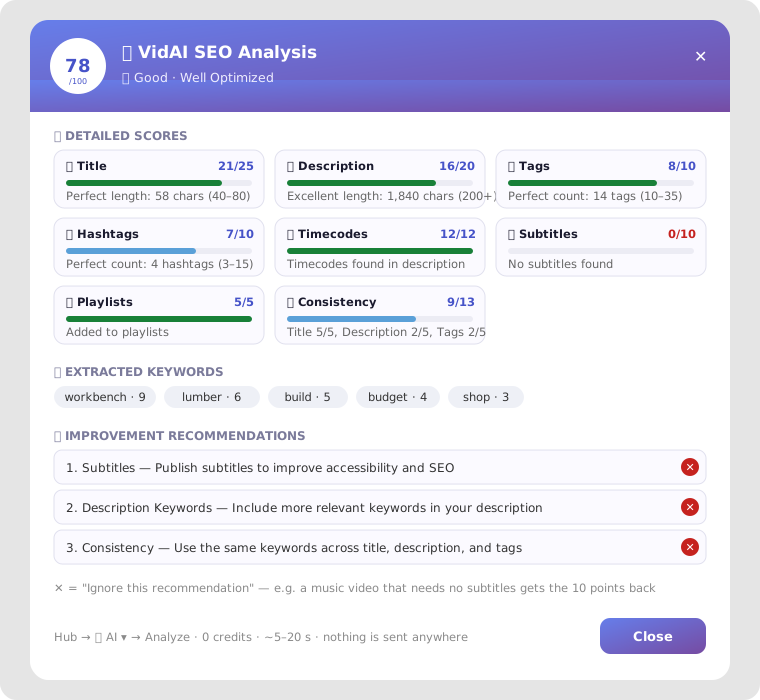
- The score and rating — 🌟 Excellent from 81, 🟢 Good from 61, 🟡 Average from 41, 🟠 Needs Work from 21, 🔴 Poor below.
- Eight score cards, each with its points, a bar and a one-line reason ("Perfect length: 58 characters (optimal: 40-80)", "No subtitles found").
- Extracted keywords — the words that appear two or more times across your title, description, tags and hashtags (top 10, with counts). This is what the Analyzer means by "keywords": not a search-volume database, but your own repeated terms — which is exactly what makes a video read as "about" something.
- Improvement recommendations — one line per missing point, most valuable first.
- ✕ Ignore next to each recommendation: if a recommendation genuinely doesn't apply (a music video with no speech doesn't need subtitles), ignore it and the points come back — the full 10 for subtitles, the full 12 for timecodes, a partial credit for the rest. The score is for your video, not a generic ideal.
How every point is earned
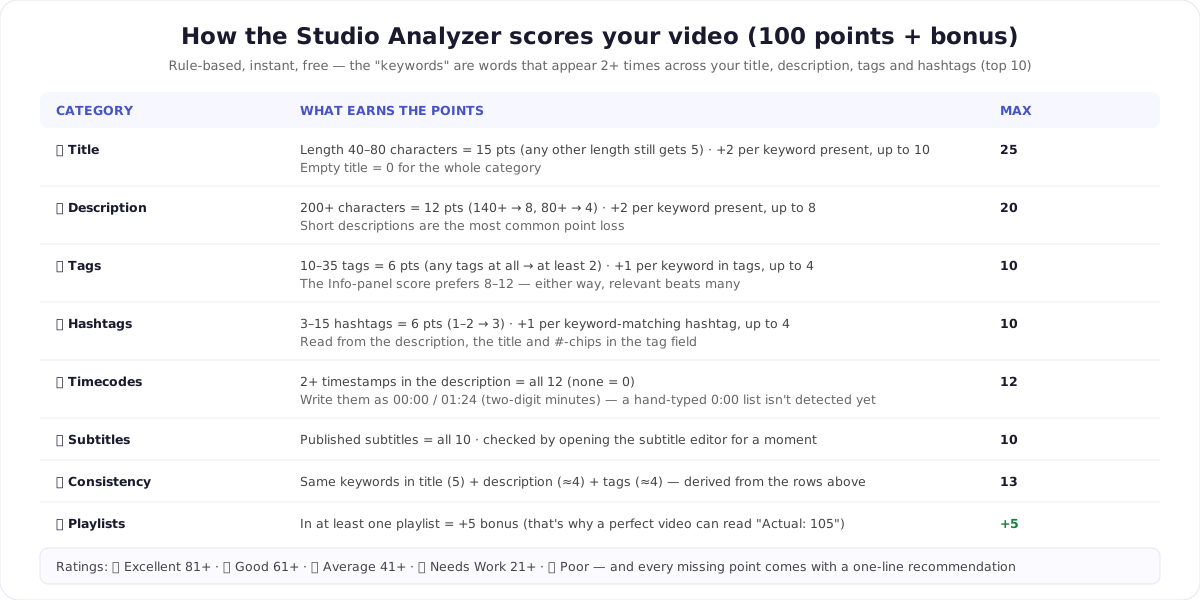
- Title — 25. Fifteen points for a length of 40–80 characters (any other length still earns 5; an empty title zeroes the category), plus 2 per extracted keyword that appears in the title, up to 10. So a 58-character title that carries your two main terms scores 19–21.
- Description — 20. Twelve points for 200+ characters (140+ earns 8, 80+ earns 4), plus 2 per keyword present, up to 8. The single most common point loss on real channels is a two-line description.
- Tags — 10. Six points for a tag count the Analyzer considers healthy (today anywhere from 10 to 35; any tags at all earn at least 2), plus 1 per keyword found in the tags, up to 4.
- Hashtags — 10. Six points for 3–15 hashtags (1–2 earn 3), read from the description, the title and any
#chips in the tag field, plus 1 per hashtag that matches a keyword, up to 4. Remember YouTube's own rule — more than 15 and it ignores them all (the hashtag rules). - Timecodes — 12. All or nothing: two or more timestamps in the description. Write them two-digit (
00:00,01:24) — VidAI's Chapters button does; a hand-typed0:00list isn't detected yet. - Subtitles — 10. All or nothing: subtitles published (how to publish them).
- Consistency — 13. Derived from the rows above: do the same keywords show up in the title, the description and the tags? Title 5, description and tags about 4 each.
- Playlists — +5 bonus. In at least one playlist. It's a bonus on top of the 100, so a flawless video shows 100 with an "(Actual: 105)" note.
A language caveat we'd rather state than hide: the keyword extraction currently recognises Latin-script words and hashtags only. A Ukrainian or Russian video still gets the length, timecode, subtitle and playlist points, but its keyword and hashtag matches score lower than they should. That's a defect, not a judgement of the video, and it's in the fix queue.
The other number: any video, on youtube.com
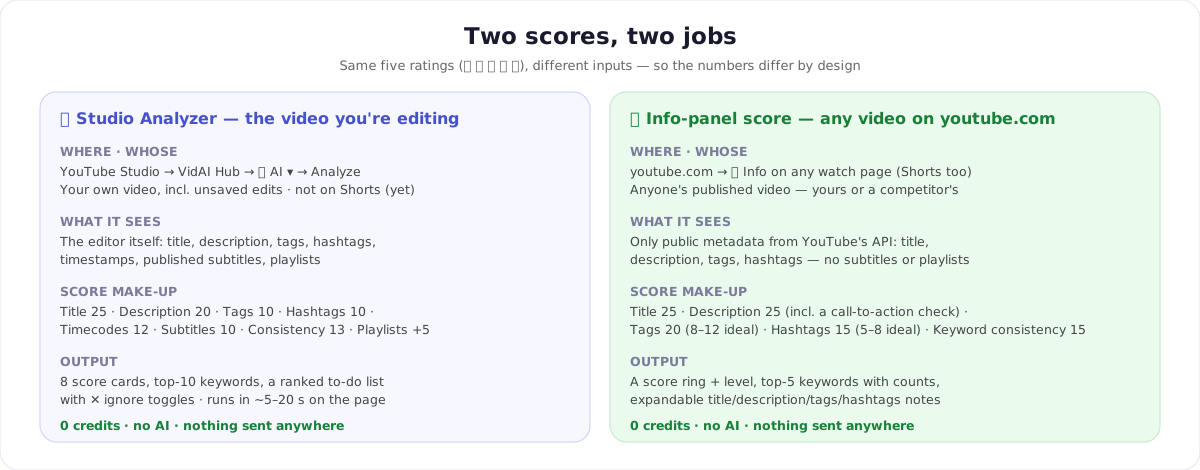
On youtube.com, the 🎬 Info button VidAI adds to every watch page (the same panel that shows monetization and tags) includes a VidAI SEO Score for that video — yours or anyone's, Shorts included. Because it only has YouTube's public metadata, it grades five things: title (25), description (25, including whether there's a call-to-action phrase), tags (20 — ideal 8–12), hashtags (15 — ideal 5–8) and keyword consistency (15), with the same five ratings and the top five keywords with their counts.
The two scores are deliberately different instruments: the Studio Analyzer sees things only the editor knows (timestamps, published subtitles, playlists, even unsaved edits); the Info score sees what the public sees. Use the first to fix your own video before publishing, the second to study what a competitor's video does right — then Copy for AI if you want an assistant's opinion on the same data.
A two-minute routine before Publish
- Analyze. Read the lowest cards first.
- Fix the big, cheap ones: description under 200 characters → generate a short one (Insert, then trim); no timestamps → Chapters; no subtitles → publish them; no tags → generate them.
- Make the keywords agree. The consistency points come from using the same two or three terms in title, description and tags — the cheapest 13 points on the board.
- Ignore what doesn't apply (✕) so the number reflects your video.
- Re-run. It's free and instant.
What the score doesn't measure
The Analyzer grades the metadata — the text YouTube reads. It says nothing about your thumbnail, your hook, retention or whether the topic has an audience; a 100/100 with a bad thumbnail still won't get clicked. Treat it as the pre-flight checklist for the part you can fix in two minutes, not as a prediction of views.
FAQ
Does it use AI? No. Both scores are deterministic rules — instant, free, and the same for everyone. VidAI's AI features are the generators the recommendations point you to.
Why did my score change after I edited the title? Because the Analyzer reads the editor live, including unsaved edits. Re-run after each fix.
Why is the tag advice different in the two places? The Studio Analyzer gives full tag points from 10 tags up; the Info score prefers 8–12. Both agree on the thing that matters: relevant tags that repeat your keywords beat a long, loose list.
Is there a "fix it" button? Not in the report — recommendations are text. The generators are one click away in the same Hub (✨ AI ▾) and the Generate ▾ menu.
Does it work on a draft? Yes — it reads the page, so an unsaved draft scores too. Subtitles and playlists only exist once the video is saved.
Run it on your last upload: Install VidAI, open the video in Studio, ✨ AI ▾ → Analyze.



